
How-To
How to Plan a Gaming PC Build (Without a Spreadsheet)
A real 2026 gaming PC under $3,000 — Ryzen 7 9800X3D, an RTX 5070 or 5070 Ti and everything around them — with verified prices and the traps we hit.


Every PC build starts the same way: eleven browser tabs, a spreadsheet you’ll abandon by Thursday, and the creeping suspicion that the RAM in tab six doesn’t match the motherboard in tab four. We planned a real 2026 gaming build in a Huntli Stash instead: component by component, prices verified, compatibility tracked, budget running live. This is that build, including the parts where the tooling caught us being wrong.
Two decisions define the build
Everything in a gaming PC orbits the CPU and the GPU. Get those two right and the rest of the list mostly picks itself.
CPU: AMD Ryzen 7 9800X3D, verified from $437.07
Eight Zen 5 cores under AMD’s 3D V-Cache, scored 85 with a gaming-performance score of 95, and the component Huntli’s comparison names the foundation of the whole build. It also makes the first compatibility decision for you: you’re now on the AM5 socket, and every motherboard that isn’t AM5 just left the conversation.
GPU: the Ti question
Rather than pretend there’s one right answer, we scored both candidates head-to-head:
- MSI GeForce RTX 5070 Ti Ventus 3X OC, verified from $1,010.87, scored 73. 16GB of GDDR7 and the faster core: the 1440p high-refresh and entry-level 4K pick.
- ASUS Prime GeForce RTX 5070 OC, verified from $799.99, scored 74. 12GB, and the better value and efficiency of the two, built for mainstream 1440p.
A point apart, so Huntli’s head-to-head gives a conditional verdict, and the condition is yours to set. The Ti buys 16GB of VRAM and the faster core, the headroom for 4K or heavily modded games at maximum textures. The 5070 is $211 cheaper and wins on value. Both sit well above NVIDIA’s launch prices ($549 and $749), which makes this the one decision in the build where the price, not the score, may make it for you. (We first planned this build around NVIDIA’s own Founders Editions. They sell out at list price and never had a retail offer Huntli could confirm, so the Stash now carries two partner cards that retailers actually stock.)
The parts that follow
- Motherboard: ASUS ROG Strix B650E-F Gaming WiFi, verified from $139.99, scored 82. AM5 for the CPU, PCIe 5.0 for the GPU and future storage, and a BIOS-and-software score of 90. B650E is the sweet spot; X870 boards add cost, not frames.
- Memory: G.Skill Trident Z5 Neo RGB 32GB (2×16GB) DDR5-6000 CL30, verified from $559.99, scored 80. DDR5-6000 CL30 is the known Ryzen sweet spot. It’s also the part whose price moved most since we first priced this build in July, and it has overtaken the CPU on the bill.
- Storage: Crucial T500 2TB, about $265. A DRAM-cached PCIe 4.0 drive rated up to 7,400 MB/s, and 2TB because modern install sizes made 1TB a running joke. We first priced the Samsung 990 Pro here ($389.99); the T500 is the same class of drive for about $125 less, which is what brought the all-premium build under $3,000.
- Power: Corsair RM850x (2024), scored 85, level with the CPU as the build’s highest, verified from $114.99. 850W, 80 PLUS Gold, fully modular, sized with headroom for the 5070 Ti’s transient spikes, the spec people undersize most often.
What the compatibility tracker caught
This is the part a spreadsheet can’t do, because a spreadsheet only knows what you typed into it. A Build a System Stash tracks the constraints between parts, and this build tripped three of them along the way:
- The socket chain. Choosing the 9800X3D silently rules out every non-AM5 board. The Stash carries that constraint forward, so an incompatible motherboard shows up flagged instead of looking like a bargain.
- The memory-profile trap. DDR5 kits advertise their speed via XMP (Intel) or EXPO (AMD) profiles. An XMP-only kit on an AMD board can boot at slow default timings: the classic “why is my new PC sluggish” mystery. The Trident Z5 Neo is EXPO-certified, which is precisely why it’s the pick.
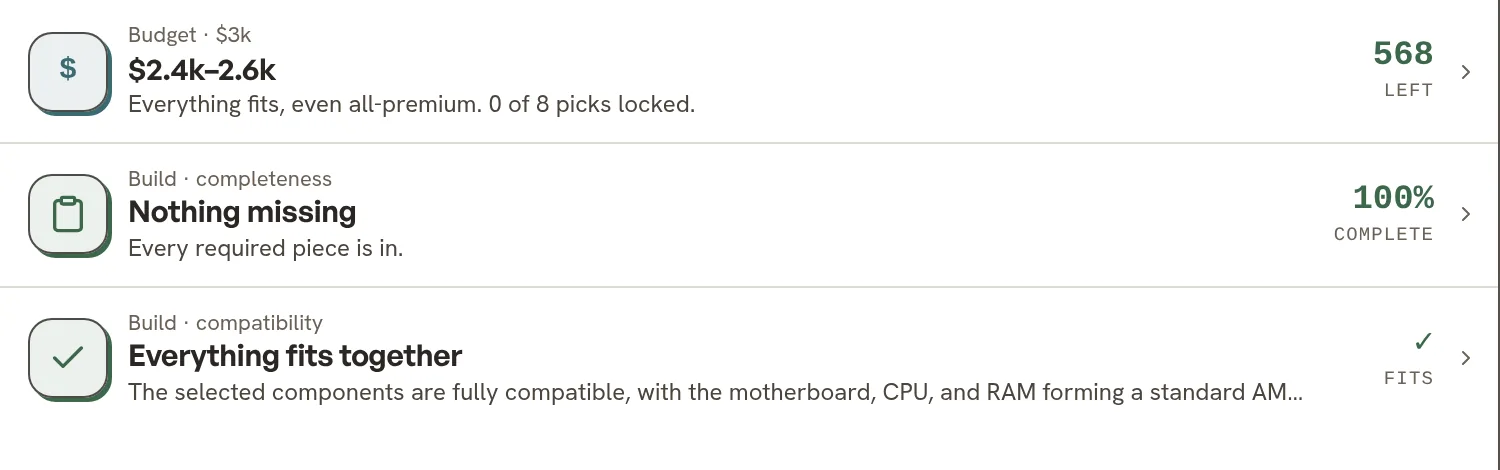
- The choice is not a conflict. Two graphics cards sit in the Stash while we decide between them. The Stash files them as one choice (“pick one”), so the budget counts one card at a time and the compatibility check tests each against the power supply and the case instead of warning that a build can’t use two. It also checks the physical fit: the Lancool 207 takes a card up to 375 mm, and both cards clear it.
What the completeness check caught
Compatibility asks “do these parts work together?” Completeness asks the sneakier question: “what’s not here?” The Stash’s built-in completeness check rates this list 75% complete and names what a seven-item list still hides: a CPU cooler (the 9800X3D ships without one) and a case, with case fans, the operating system everyone forgets and the peripherals filed under “recommended” rather than “required.” So we added them:
- Cooler: Thermalright Peerless Assassin 120 SE, verified from $34.90. A twin-tower air cooler that keeps an eight-core X3D chip cool and quiet, for a fraction of a liquid cooler’s price.
- Case: Lian Li Lancool 207, verified from $80, scored 82. An airflow case with two 140 mm intake fans fitted, room for either card and the cooler, and the Stash’s best-cooling badge.

The running total
The seven parts around the graphics card come to about $1,632 at the prices above. The ASUS 5070 takes the build to about $2,432, the MSI Ti to about $2,643: both inside a $3,000 budget, with the operating system and peripherals still to come. The Stash tracks that arithmetic live against your budget as prices shift, so the total you’re looking at is never Thursday’s total.
The method, reusable
Start a Build a System Stash. Add the two defining parts first. Let every later search inherit their constraints. Run the completeness check before you spend a cent. The spreadsheet dies — and the assembly-day surprises die with it.
The research behind this guide
9 items · Build a System · public Stash
Gaming PC Build
Every item, score and retailer price this guide quotes, in the read-only Stash it was researched in.